Case Study · Custom WordPress
Central Hospital Pabna
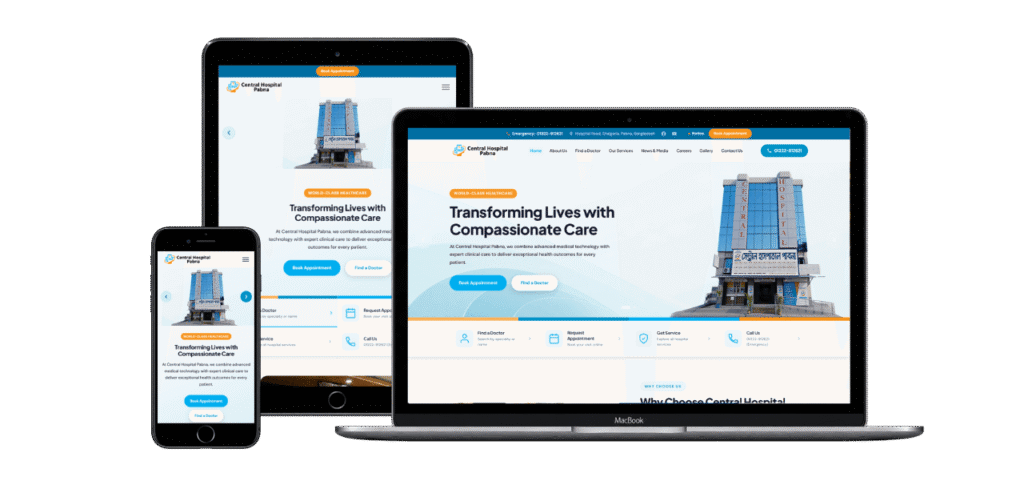
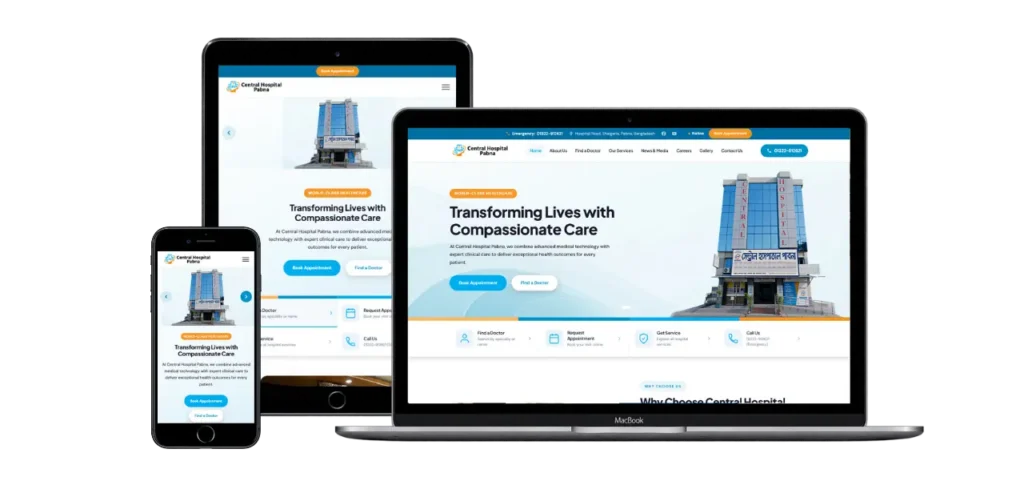
Central Hospital Pabna is a multi-specialty hospital on Hospital Road, Shalgaria, serving patients across Pabna and the surrounding districts. Its previous website ran on a third-party template managed by an outside agency, which limited content control, misrouted patient enquiries and broke the speciality-to-appointment journey. We rebuilt it as a fully custom, ACF-Free WordPress theme the hospital owns and runs in-house.
- Role
- WordPress Developer · Doctorsbranding
- Client
- Central Hospital Pabna
- Year
- 2026
- Stack
- WordPress · ACF · Gravity Forms · PHP · JavaScript · Nginx
Visit live site · centralhospitalpabna.com
01 The challenge
Four problems were undermining the whole digital experience.
Limited content control
Adding a doctor, updating contact details, publishing a notice or posting a vacancy each needed a developer. The hospital owned its domain but had no practical way to manage its own content.
Patient enquiries were being misrouted
Contact, appointment and job-application forms sent submissions to the previous agency’s inbox. Patients saw a success message; the hospital never received the enquiry — a serious patient-service failure for a healthcare provider.
The patient journey was broken
The speciality and doctor directories looked connected but were not. Department filters missed doctors split across paginated results, and appointment forms did not keep the speciality or doctor a patient had already chosen.
The mobile experience was not built for mobile
The hero slider relied on desktop imagery and overlay text. On phones, copy became hard to read, images cropped unpredictably, and the site felt like a compressed desktop layout.
02 The solution
Rather than another off-the-shelf template, we built a purpose-made WordPress platform around the hospital’s content and workflows.
A flexible Site Settings system on ACF Free
The previous build depended on ACF Pro for global settings and repeatable content. We replaced it with a custom Site Settings screen built on standard WordPress Pages and ACF Free, using fixed-slot fields in place of Pro repeaters for the hero slider and visiting hours.
- Contact details, social links and visiting hours
- Hero slider content, including separate desktop and mobile artwork
- Every other site-wide setting, from one screen
A custom helper layer connects the theme to this page, so the team manages global information without touching code — and without an ACF Pro licence.
Reconnecting the patient journey
The doctor directory relied on WordPress pagination, so the JavaScript filter could only see doctors on the current page and some departments looked empty when they were not. We changed the architecture to load the complete doctor dataset and filter it in the browser, instantly.
The journey is now Speciality → Doctor → Appointment: choosing a speciality carries the department into the directory, and choosing a doctor pre-selects that doctor’s speciality and name on the appointment form.
A mobile hero designed to be read
Instead of layering gradients over complex photography, we built a dedicated mobile layout. The image gets its own uncropped section, the copy moves to a separate text block with larger type, and each slide can carry its own mobile image — all uploaded from the same admin screen.
Security and infrastructure hardening
Because the site handles healthcare enquiries, the existing installation was audited and hardened before launch:
- Gravity Forms notification recipients corrected so contact, appointment and job submissions reach the hospital directly
- XML-RPC blocked at the request level, not only through the standard authentication filter
DISALLOW_FILE_EDITenabled to stop dashboard editing of theme and plugin code- Security headers added — X-Frame-Options, X-Content-Type-Options, Referrer-Policy, Permissions-Policy — and the WordPress version signature removed from public output
- Polylang removed: installed but translating nothing, so pure overhead
Under the hood
filemtime()-based asset versioning, so updated CSS and JavaScript are re-fetched automatically after each deploy- Doctor ordering standardised on publish date, since the old
menu_ordervalues were all identical - A shared SVG speciality-icon helper as a single source of truth, with no icon-font dependency
- Around 428 KB of stale HTML prototype files removed from the theme
- The job-application form pre-fills the position from the vacancy and validates Bangladeshi phone numbers before submission
- No build tool — PHP, CSS and vanilla ES5 JavaScript, with no npm, webpack or front-end framework
03 Results
- Patient enquiries — contact, appointment and job applications — now reach the hospital’s own inbox instead of a third party’s
- The in-house team manages doctors, jobs, notices, gallery items, site settings and hero content directly in WordPress, with no developer needed for routine updates
- The Speciality → Doctor → Appointment flow works end to end, with filters covering the full directory and the appointment form retaining the chosen doctor and speciality
- A mobile-first hero with its own responsive layout, larger typography and per-slide mobile imagery
- Four custom post types (Doctor, Job, Notice, Speciality) and two taxonomies now model the hospital’s content
- Hardened before launch: XML-RPC locked down, dashboard file editing disabled, security headers in place, unused plugins removed
- No page-builder lock-in — hand-authored PHP, CSS and JavaScript the hospital fully owns
The engagement was digital-infrastructure work, not a reskin. It moved Central Hospital Pabna off a restrictive agency template and onto a platform the hospital — not the agency — controls.
Have a project like this?
Planning custom WordPress development, a performance rebuild, WooCommerce or an API integration? Let’s talk.
Let’s Talk